Showing a digital pet portrait on a TV, phone or digital frame
How a tall pet portrait fits a wide 16:9 TV, a phone or a digital frame, what cropping costs, where to put the screen, and how to keep the file safe for years.
By Purrealism. Part of Framing and hanging a royal pet portrait: frames, glass, walls and light.
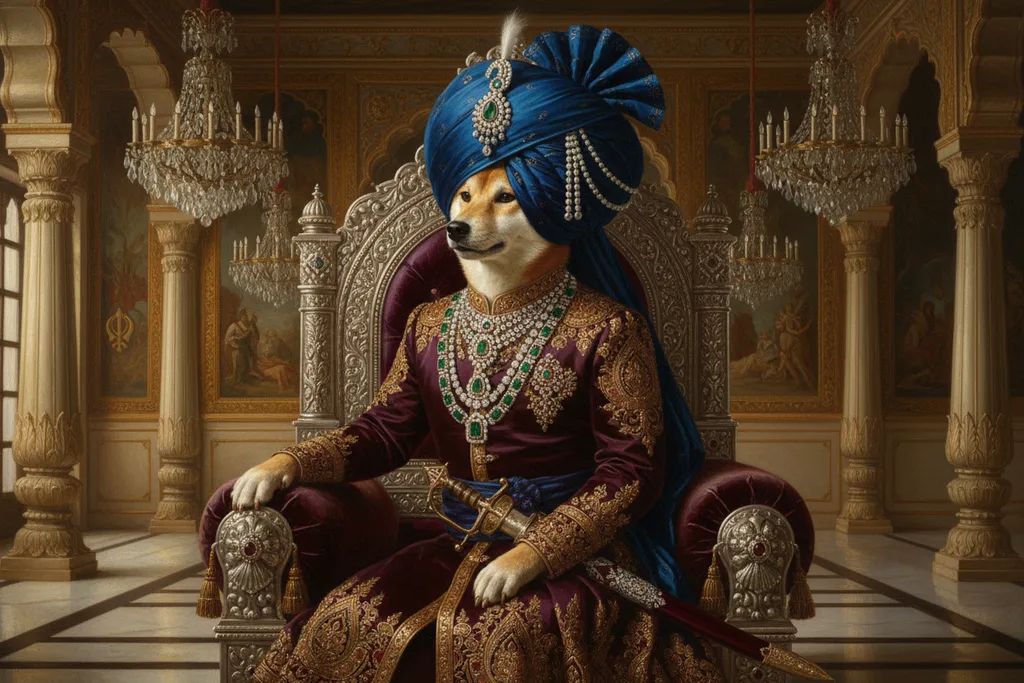
This page is for the digital edition of a royal pet portrait: the high-resolution download that Purrealism calls the digital pack. It explains how a tall portrait fits the wide screens most people own, what you lose if you crop it to fill a television, where to put a screen so the portrait is easy to see, and how to keep the file safe so you can show it or print it years from now. A framed print needs glass, a mat and a hook; a digital portrait needs a screen and a backup. The main framing and hanging guide covers the printed edition, and the portrait studio lets you choose either edition when you order.
Screens are wide; portraits are tall
All four Purrealism print sizes are taller than they are wide when they hang upright: 8 × 10, 12 × 16, 18 × 24 and 24 × 36 inches, width first. A television is the other way round.
The shape of a television is set by international standards. The International Telecommunication Union (ITU) publishes international recommendations for the television picture. Its Recommendation BT.709 sets the picture for high-definition television at 1920 pixels across and 1080 down, a shape of 16:9. Its Recommendation BT.2020 sets two ultra-high-definition sizes, 3840 × 2160 and 7680 × 4320 pixels, with the same 16:9 shape. Both standards use square pixels, so an image shown pixel for pixel keeps its true proportions.
A 16:9 screen is 16 units wide for every 9 units tall. A 12 × 16 inch print is 3 units wide for every 4 tall. Put one on the other, and they do not match.
Showing the whole portrait
The first choice is to show the whole portrait, top to bottom. The screen then fits the portrait's height and leaves empty space at the sides.
Here is how much of a 3840 × 2160 screen a tall portrait fills, for each of the shapes of the four print sizes. The same percentages apply to a 1920 × 1080 screen, because the shape is the same.
| Portrait shape | Print size with that shape | Width used on a 3840 × 2160 screen | Share of the screen width |
|---|---|---|---|
| 4:5 | 8 × 10 in | 1728 pixels | 45% |
| 3:4 | 12 × 16 in and 18 × 24 in | 1620 pixels | 42% |
| 2:3 | 24 × 36 in | 1440 pixels | 37.5% |
Each figure is the screen height, 2160 pixels, multiplied by the portrait's width-to-height ratio. The empty space on each side can be black, or a dark colour if the screen or app lets you choose one.
To find the shape of your own file, look at its width and height in pixels in your device's file information, then divide the width by the height. A result of 0.75 means 3:4, 0.8 means 4:5, and 0.667 means 2:3.
Cropping to fill the screen
The second choice is to crop the portrait so that it fills the whole screen. This removes most of the picture.
To fill a 16:9 screen, a tall picture must be cut to a band whose height is 9/16 of its width. For a 3:4 portrait, that band keeps 42% of the original height. For a 4:5 portrait it keeps 45%, and for a 2:3 portrait 37.5%. In a royal portrait, the cut can remove the crown at the top, or the paws and throne at the bottom. If you do crop, keep a copy of the full file, and crop a separate copy.
A better use of a wide screen is to place two portraits side by side. Two 3:4 portraits shown at full height use 3240 of 3840 pixels, or 84% of the screen width, which suits a home with two pets. The page on planning a gallery wall around a pet portrait gives ideas for grouping portraits that work on a screen as well as on a wall.
File size compared with screen size
A screen can only show as many pixels as it has. A 3840 × 2160 screen shows at most 2160 rows of pixels from top to bottom, and a 1920 × 1080 screen shows 1080. When a file has more rows than the screen, the device shrinks the image to fit, and the screen shows every part of the portrait with fewer pixels. When a file has fewer rows than the screen, the device enlarges it, and fine details such as whiskers and the edges of jewels can look soft.
To check, compare the file's height in pixels with the screen's height. A file at least as tall as the screen, in pixels, fills the height with no enlarging. Keep the original file unchanged, and let each screen do its own shrinking, so the full detail is still there when you want a print.
Phones, computers and digital photo frames
Phones are tall screens when held upright, so a tall portrait fits them better than a television does. Computers and most laptops are wide, like a television. Digital photo frames come in many shapes. Before you choose where to show the portrait, look up the screen's pixel size in its settings or its specifications, and run the same sum as above: screen height multiplied by the portrait's width-to-height ratio gives the width it will use.
If the portrait looks stretched or squashed, the screen is not showing it pixel for pixel. Look for a zoom, fit or picture size setting on the device, and choose the one that shows the whole image without changing its shape.
Where to put the screen
A screen showing a portrait has two of the same problems as a framed print: glare and safety.
Glare. A screen's glass is smooth, and Florida State University's guide to reflection explains that a smooth surface reflects light at a definite angle, equal to the angle at which it arrives. A window facing the screen appears in it. The Canadian Conservation Institute makes the same point about museum rooms: any bright lamp or window shining toward the viewer reduces what they can see. Place the screen at right angles to the windows, or close the blinds when you want to show the portrait.
Height. A screen is looked at from the sofa more than from standing. The page on how high to hang a pet portrait gives measured eye heights for seated and standing adults, which apply to a screen as much as to a frame.
Safety. Health Canada advises securing a flat-screen TV to the wall where possible, and says that if you use a stand, the TV should be attached to both the stand and the wall. It warns that children sometimes try to climb on furniture and TVs, which can make them tip over. The Government of Canada's earthquake advice also says to attach flat-screen TVs securely to a wall so they will not fall. For a small digital frame on a shelf, the same earthquake advice suggests anti-skid pads or a hook and loop fastener under small appliances, to keep them from falling.
Keeping the file safe
A print can fade; a file can be lost. The Library of Congress gives clear advice for keeping personal digital photos, and it applies directly to a digital portrait:
- Pick the best version. If you have more than one version of the file, keep the one with the highest quality.
- Name it well. Give the file a descriptive name and tag it with names and subjects. A name such as the pet's name, the style and the year is easy to find later.
- Make at least two copies. The Library says more copies are better. Keep one on your computer and put the others on separate media, such as a portable hard drive, a USB stick or online storage.
- Store the copies apart. Keep copies in different locations, as far apart as practical, so that a fire or flood in one place leaves the other copy safe.
- Check it once a year. Open the file at least once a year to make sure it still reads.
- Refresh the copies. Make new copies on fresh media every five years, or sooner if needed.
The Library also suggests keeping a list of your saved photos with your important papers in a secure place.
Printing it later
A digital pack keeps the choice open. If you later want the portrait on a wall, the Purrspectives article how big is an 8 × 10 print gives the pixels each print size needs, and the pricing page lists the four print sizes and two paper finishes. When the print arrives, the rest of this guide covers the frame, the mat, the glazing and the nail.
Questions and answers
What shape is a standard TV screen?
A standard TV screen is 16:9, which means 16 units wide for every 9 units tall. The International Telecommunication Union sets this shape in Recommendation BT.709 for high-definition television, at 1920 by 1080 pixels, and again in BT.2020 for ultra-high-definition television. Both standards use square pixels, so an image shown pixel for pixel keeps its true shape.
How many pixels does an ultra-high-definition TV have?
An ultra-high-definition TV has 3840 pixels across and 2160 down, or 7680 across and 4320 down. These are the two sizes in the International Telecommunication Union's Recommendation BT.2020. A 3840 by 2160 screen has four times the pixels of a 1920 by 1080 screen. Both keep the 16:9 shape of high-definition television, which the union's BT.709 standard sets at 1920 by 1080 pixels.
Why does a tall portrait show black bars on a TV?
A tall portrait shows black bars on a TV because the screen is wide and the picture is tall. On a 16:9 screen 3840 pixels wide and 2160 high, a portrait with the 3:4 shape of a 12 × 16 inch print fills the full height but only 1620 pixels of the width. That is 42% of the screen, and the rest stays empty.
How much of a portrait is lost when it is cropped to fill a TV?
A tall portrait cropped to fill a 16:9 TV loses most of its height. A picture with the 3:4 shape of a 12 × 16 inch print keeps 42% of its height, a 4:5 picture keeps 45%, and a 2:3 picture keeps 37.5%. On a royal pet portrait, that crop can remove the crown, the paws or both.
How many copies of a digital portrait should you keep?
Keep at least two copies of a digital portrait, and more if you can. The Library of Congress gives this advice for important personal photos. It suggests keeping one copy on your computer and others on separate media, such as a portable hard drive, a USB stick or online storage, so that one failure cannot take every copy.
Where should backup copies of a digital portrait be stored?
Backup copies of a digital portrait should be stored in different places, as far apart as practical. The Library of Congress advises this for personal photos, so that if disaster strikes one location, the copy in the other place stays safe. It also suggests putting a list of your saved photos with your important papers in a secure place.
How do you make sure a digital portrait file still opens in the future?
To make sure a digital portrait file still opens in the future, check it and copy it on a schedule. The Library of Congress advises checking your saved photos at least once a year to make sure you can read them, and making new copies on fresh media every five years or sooner if needed, to avoid losing the data.
What should you name a digital portrait file?
Give a digital portrait file a descriptive name, such as the pet's name, the portrait style and the year. The Library of Congress advises descriptive file names for personal photos, tags with names and subjects, and a simple folder structure. A name like biscuit-maharaja-2026 is easy to find years later.
Should a TV used to show a portrait be fixed to the wall?
A flat-screen TV used to show a portrait should be fixed to the wall if possible. Health Canada advises securing flat-screen TVs to a wall, and says that if you use a stand, the TV should be attached to the stand and the wall. The Government of Canada's earthquake advice also says to attach flat-screen TVs securely so they will not fall.
Where should a screen go to avoid glare on a digital portrait?
A screen showing a digital portrait should face away from windows and bright lamps. The Canadian Conservation Institute says any bright lamp or window shining toward the viewer reduces what they can see. Florida State University's guide to reflection explains that smooth surfaces reflect light at the same angle it arrives, so a window facing the screen shows up in it.
Sources
- Recommendation ITU-R BT.709-6: Parameter values for the HDTV standards for production and international programme exchange, International Telecommunication Union. Accessed September 28, 2026.
- Recommendation ITU-R BT.2020-2: Parameter values for ultra-high definition television systems for production and international programme exchange, International Telecommunication Union. Accessed September 28, 2026.
- Digital Photos: Personal Archiving, Library of Congress. Accessed September 28, 2026.
- Furniture, appliance and television tip-overs, Health Canada. Accessed September 28, 2026.
- Earthquakes: Get prepared, Government of Canada. Accessed September 28, 2026.
- Agent of Deterioration: Light, Ultraviolet and Infrared, Canadian Conservation Institute. Accessed September 28, 2026.
- Specular and Diffuse Reflection, Molecular Expressions, Florida State University. Accessed September 28, 2026.
Short reads on this topic
Articles from Purrspectives that answer one question each.
Cat wall art ideas: choosing a cat portrait for every room
Cat wall art for each room: the print size for a hall, living room, bedroom or small flat, the cat portrait that suits its colours, and where to keep it safe.
Dog wall art ideas: how to choose and hang a portrait of your dog
Good dog wall art fits its wall: pick a print size for the furniture below, hang it with its centre at eye level, and keep it out of direct sun.
How big is an 8 × 10 print? Pet portrait print sizes explained
An 8 × 10 print is 20.32 × 25.4 cm, with a 4:5 shape. See all four portrait print sizes in cm, plus the pixels, frames and mats each one needs.