Print sizes and shapes: why a photo gets trimmed to fit the paper
Each print size has a shape, and a photo of another shape loses part of two edges to fill it. See how much each common photo shape loses at each size.
By Purrealism. Part of Art prints and paper: how a portrait print is made, sized and kept.
Every print size has a shape as well as a size. When a photo has a different shape from the paper, part of the photo has to be trimmed to fill the sheet, or the print gets blank borders. This page explains how to find the shape of a photo and of a print, which edges get trimmed, and how much each common photo shape loses at each of the four Purrealism print sizes. For how big each size is in centimetres and where it suits a room, read how big is an 8 × 10 print. This page belongs to the guide to art prints and paper.
The shape of a print
The shape of a rectangle is its aspect ratio: its width compared with its height, reduced to the smallest whole numbers. An 8 × 10 print reduces to 4:5, because both numbers divide by 2. A 12 × 16 print and an 18 × 24 print both reduce to 3:4. A 24 × 36 print reduces to 2:3, because both numbers divide by 12.
A second way to compare shapes is to divide the short side by the long side. The result is the same for any size of the same shape.
| Print size | Aspect ratio | Short side ÷ long side |
|---|---|---|
| 8 × 10 in | 4:5 | 0.8 |
| 12 × 16 in | 3:4 | 0.75 |
| 18 × 24 in | 3:4 | 0.75 |
| 24 × 36 in | 2:3 | 0.667 |
The higher the number, the closer the shape is to a square. The 8 × 10 print is the squarest of the four, and the 24 × 36 print is the longest and narrowest.
The shape of a photo
A photo's shape comes from its pixel width and height. Divide both by the same number until they cannot be reduced further. A photo of 3,024 × 4,032 pixels divides by 1,008 to give 3:4. A photo of 4,000 × 6,000 pixels divides by 2,000 to give 2:3. A photo of 1,080 × 1,920 pixels divides by 120 to give 9:16.
The University of Chicago Press, in its guide for authors, says the pixel dimensions are listed in the file's properties and shown by most photo editing programs. So you can find the shape of any photo before you print it.
Why a photo gets trimmed
To fill a sheet from edge to edge, the photo is enlarged until it covers the whole paper. It stops growing when it covers the paper in the direction that runs out first. The rest of the photo then hangs over the paper in the other direction, and that part is trimmed.
Which edges lose the strip depends on which shape is wider:
- The print is wider in shape than the photo. The photo fills the width first, so strips come off the top and bottom.
- The print is narrower in shape than the photo. The photo fills the height first, so strips come off the two sides.
Here is one example of each. An upright 3:4 photo (0.75) on an 8 × 10 print (0.8) meets a print that is wider in shape, so its top and bottom are trimmed. The same photo on a 24 × 36 print (0.667) meets a narrower shape, so its sides are trimmed.
The trimmed share of the photo is one shape number divided by the other, taken away from 1. For the 3:4 photo on 8 × 10 paper, 0.75 ÷ 0.8 = 0.9375, so 6.25 percent of the photo is trimmed. On 24 × 36 paper, 0.667 ÷ 0.75 = 0.889, so 11.1 percent is trimmed.
How much each common photo shape loses
The table below uses that method for five photo shapes. Each figure is the percent of the photo's area trimmed to fill the paper, rounded to a whole number, with the photo and the print both upright.
| Photo shape | 8 × 10 in | 12 × 16 in | 18 × 24 in | 24 × 36 in |
|---|---|---|---|---|
| 4:5 | 0 | 6 | 6 | 17 |
| 3:4 | 6 | 0 | 0 | 11 |
| 2:3 | 17 | 11 | 11 | 0 |
| 9:16 | 30 | 25 | 25 | 16 |
| 1:1 (square) | 20 | 25 | 25 | 33 |
Two patterns stand out. Every photo shape matches one print shape exactly, except the two shapes at the bottom, which lose a share at every size. And a square photo loses the most on the tallest print, because the gap between the two shapes is widest there.
Borders instead of a trim
If you want to keep the whole photo, you can print it smaller than the paper and leave blank borders. The size of the borders follows from the same shape numbers.
Take a 3:4 photo on 8 × 10 inch paper. Printed to the full 10 inch height, it is 7.5 inches wide (10 × 0.75). That leaves 0.5 inches of blank paper across the width, which is 0.25 inches at each side when the photo is centred. A 2:3 photo on the same paper is 6.67 inches wide at full height, which leaves 0.67 inches at each side.
If the print will be framed, plan the borders together with the frame and any mat. The guide to framing and hanging covers frames and mats.
Upright or wide
A print can hang upright or on its side. Turning the paper changes its shape from 3:4 to 4:3, for example. The trim is smallest when the print is turned the same way as the photo. An upright 3:4 photo on an upright 12 × 16 print loses nothing. On the same paper turned wide, 16 × 12, it would lose 44 percent of its area, because the photo's shape number (0.75) would be compared with the paper's (1.333).
The print resolution calculator further down this page works this way. You type a photo's pixel width and height, or let it read them from a photo you choose. For each of the four sizes it turns the print to match the photo, trims the photo at two opposite edges to match the print's shape, and shows the pixels per inch after the trim, the band that figure falls in and the percent of the photo trimmed. The page on print resolution explains the pixels per inch.
Inch sizes and the ISO A sizes
The four print sizes are measured in inches. The United States defines the inch as exactly 25.4 millimetres, according to the National Institute of Standards and Technology, which dates that definition to July 1, 1959.
Most countries use a different family of paper sizes. Markus Kuhn's guide to international paper sizes at the University of Cambridge explains the ISO 216 system. In it, the long side of every sheet is the square root of two times the short side, 1.4142. This shape has one useful property: cutting a sheet in half, parallel to its short side, gives two sheets of the same shape. A0 has an area of one square metre, A1 is half of A0, and so on down to A4, which measures 210 × 297 millimetres.
The guide says Germany adopted these sizes as the standard DIN 476 in 1922. They became the international standard ISO 216 in 1975, and they are now used in almost every country except those in North America.
For a print, the A shape (short side ÷ long side = 0.707) falls between the 2:3 shape of a 24 × 36 print and the 3:4 shape of a 12 × 16 print. A photo printed on A4 paper and later framed in an inch-sized frame will not match its shape. Choose the print size and the frame size in the same system.
Planning a photo for the trim
Before you choose a size, look at the edges of the image that will be trimmed. For an upright 3:4 image on 8 × 10 paper, those are the top and bottom, which in a pet portrait may hold the ears, a crown or the paws. For an upright 3:4 image on the tall 24 × 36 print, they are the two sides, which may hold part of the background or a second animal.
Rollins College's library, in its advice for poster printing, suggests previewing a file at "actual size" before printing to check it. Do the same with the trim in mind: if the part you care about sits close to an edge that will be trimmed, pick the print size whose shape matches the image instead.
What this means for a royal pet portrait
Purrealism art prints come in 8 × 10, 12 × 16, 18 × 24 and 24 × 36 inches, on matte or glossy paper. You choose the size in the portrait studio. If you pick the digital download and plan to print it yourself, find the image's shape first, then choose a paper size that matches it or accept the trim shown in the table above. The page on printing a digital download covers the printer settings that control trimming and borders.
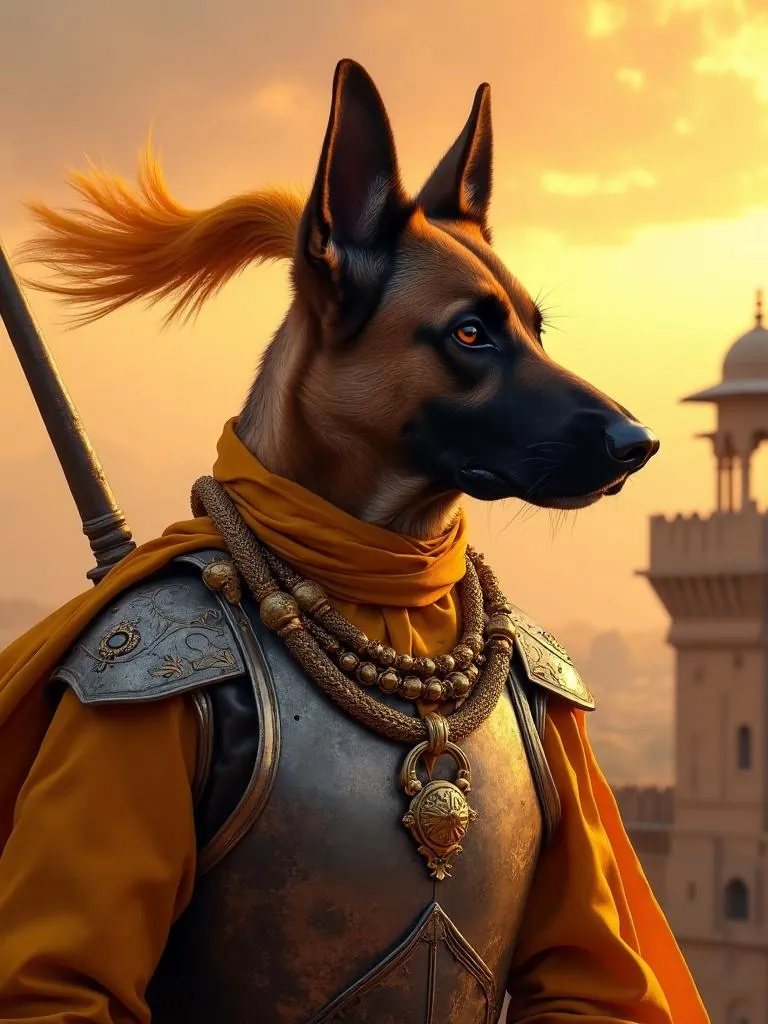
A portrait with detail near its edges gives you less room to trim. In the Rajput Warrior portrait in the gallery, a dog in armour with a fort at sunset behind, the fort's tower stands at the right edge of the image and the dog's ears reach close to the top. A print shape that trims the sides would cut into the tower, and one that trims the top and bottom would come close to the ears.
Try it
Print resolution calculator
Enter a photo's width and height in pixels, or choose the photo. The calculator shows the pixels per inch at each print size and how much of the photo each size trims.
The starting numbers, 3024 × 4032, make a 12.2 megapixel photo.
| Print size | Pixels per inch | Band | Photo trimmed |
|---|---|---|---|
| 8 × 10 in | 378 | 300 ppi or more | 6 percent |
| 12 × 16 in | 252 | 150 to 299 ppi | 0 percent |
| 18 × 24 in | 168 | 150 to 299 ppi | 0 percent |
| 24 × 36 in | 112 | Under 150 ppi | 11 percent |
The print turns to match the photo: a wide photo gets a wide print. To fill the print, the photo is trimmed at two opposite edges until its shape matches the print, and the pixels per inch are counted after that trim.
Start a portraitQuestions and answers
What aspect ratio is print paper?
Print paper has no single aspect ratio, because each size has its own shape. The four Purrealism art print sizes use three: 8 × 10 inches is 4:5, 12 × 16 and 18 × 24 inches are 3:4, and 24 × 36 inches is 2:3. The ISO 216 paper sizes used in most countries outside North America, such as A4, all share a ratio of 1 to 1.4142.
What print size is 4:3 aspect ratio?
A photo with a 4:3 aspect ratio matches the 12 × 16 inch and 18 × 24 inch print sizes exactly, because 12 to 16 and 18 to 24 both reduce to 3 to 4. A 4:3 photo is the same shape turned on its side. On an 8 × 10 inch print the same photo loses 6 percent of its area, and on a 24 × 36 inch print it loses 11 percent.
What aspect ratio to print photos?
The best aspect ratio to print a photo is the photo's own ratio, because then nothing is trimmed. Divide the photo's pixel width and height by the same number to find it: 3,024 × 4,032 pixels reduces to 3:4, and 4,000 × 6,000 reduces to 2:3. Then choose the print size with the same ratio, or accept a trim from two edges.
What print size is A4?
A4 paper measures 210 × 297 millimetres, which is 8.27 × 11.69 inches, using the United States definition of the inch as exactly 25.4 millimetres. Markus Kuhn's guide to ISO 216 at the University of Cambridge explains that A4 is one sixteenth of A0, a sheet with an area of one square metre, and that every A size has the same shape.
Why does a photo get cropped when it is printed?
A photo gets cropped when it is printed because its shape differs from the shape of the paper. To fill the paper edge to edge, the printer or software enlarges the photo until the narrower direction fits, and the extra part in the other direction falls outside the paper. A 2:3 photo printed at 8 × 10 inches loses 17 percent of its area this way.
Which edges of a photo are trimmed to fit a print?
The edges trimmed to fit a print depend on which shape is wider. If the print is wider in shape than the photo, the top and bottom of the photo are trimmed. If the print is narrower, the two sides are trimmed. A 3:4 upright photo on an 8 × 10 print loses a strip at the top and bottom, while on a 24 × 36 print it loses strips at the sides.
Can you print a square photo as an 8 × 10?
A square photo can be printed as an 8 × 10, but filling the paper trims 20 percent of the photo's area, taken from the top and bottom or from the two sides. The trim is larger on the other sizes: 25 percent on a 12 × 16 or 18 × 24 print and 33 percent on a 24 × 36 print. A square photo can also be printed with blank borders instead.
How wide are the borders if a photo is printed without trimming?
The borders on an untrimmed print depend on the difference in shape. A 3:4 photo printed whole on 8 × 10 inch paper fills the 10 inch height and is 7.5 inches wide, which leaves a blank strip of 0.25 inches at each side. A 2:3 photo printed whole on the same paper is 6.67 inches wide, which leaves 0.67 inches at each side.
Why is A4 paper a different shape from US paper sizes?
A4 paper has a different shape because the ISO 216 system gives every A size a long side 1.4142 times the short side, the square root of two. Markus Kuhn's guide at the University of Cambridge explains that cutting such a sheet in half gives two sheets of the same shape. Germany adopted the system as DIN 476 in 1922, and it became ISO 216 in 1975.
Should a pet portrait print be portrait or landscape?
A pet portrait print should usually follow the shape of the image: an upright image suits an upright print and a wide image suits a wide print. Turning the print to match avoids a large trim. A 3:4 upright image printed as a 16 × 12 landscape sheet would lose 44 percent of its area, while the upright 12 × 16 print loses nothing.
Sources
- A4 paper format / International standard paper sizes, Markus Kuhn, Department of Computer Science and Technology, University of Cambridge. Accessed September 28, 2026.
- SI Units: Length, National Institute of Standards and Technology. Accessed September 28, 2026.
- Digital art requirements, University of Chicago Press. Accessed September 28, 2026.
- Design & Printing Tips: Poster Printing Guidelines, Olin Library, Rollins College. Accessed September 28, 2026.
Short reads on this topic
Articles from Purrspectives that answer one question each.
Cat wall art ideas: choosing a cat portrait for every room
Cat wall art for each room: the print size for a hall, living room, bedroom or small flat, the cat portrait that suits its colours, and where to keep it safe.
Dog wall art ideas: how to choose and hang a portrait of your dog
Good dog wall art fits its wall: pick a print size for the furniture below, hang it with its centre at eye level, and keep it out of direct sun.
How big is an 8 × 10 print? Pet portrait print sizes explained
An 8 × 10 print is 20.32 × 25.4 cm, with a 4:5 shape. See all four portrait print sizes in cm, plus the pixels, frames and mats each one needs.